 Hisabi Ledger
From paper rolls to the books.
A browser workspace for a corrugated-box factory: materials, production, dispatch, billing and finance in one place.
One system for the work behind every box.
Hisabi Ledger connects purchasing, raw-material stock, production, delivery challans, invoicing and finance for Boxilla Packages, a corrugated-packaging manufacturer in Pakistan. I designed it and built it.
The factory ran on three tools.
None of them spoke corrugation.
Paper registers
Purchases, dispatch and payments were written by hand, so every question meant finding the right book and adding it up.
Spreadsheets
Stock lived in Excel. Nothing linked it to what was bought, produced or sent to a customer.
Generic software
General accounting tools had no idea what a reel, GSM, ply or glue ratio was, so production was not in the system at all.
Build one system around how a corrugation unit actually works and keep it simple enough for everyone who uses it.
AChallenge
Materials, production and money were tracked in separate places. Nobody could see stock, job cost or cash without assembling it by hand.
BApproach
Model the factory's real objects (reels, rolls, glue, boxes, challans) and let each record update the next one automatically.
CConstraint
Mixed digital literacy. Managers and department heads range from very comfortable to rarely at a computer, so every screen has to be obvious.
Design
- Client interviews
- Workflow mapping
- Logo & product mark
- Design system
- Desktop UI
Build
- Next.js + React
- Prisma + PostgreSQL
- Stock & cost services
- Roles & plans
- Light / dark mode
Delivery
- Data setup
- Handover & training
- Ongoing support
What did the factory actually need?
Before designing anything, I sat with the owner to understand how work moved from a paper reel to a paid invoice, and where it got lost.
“Reels, GSM, ply, glue: those words didn't exist in the software we tried.”
“If I wanted to know what a job really cost us, someone had to put it together by hand.”
“Keep it simple. If a screen confuses them, they will go back to the register.”
“A few clicks and it’s done. I even ran operations from my phone while I was on Umrah.”
The insight that shaped everything: the system has to speak the factory's language.
Three jobs,
one shared workspace.
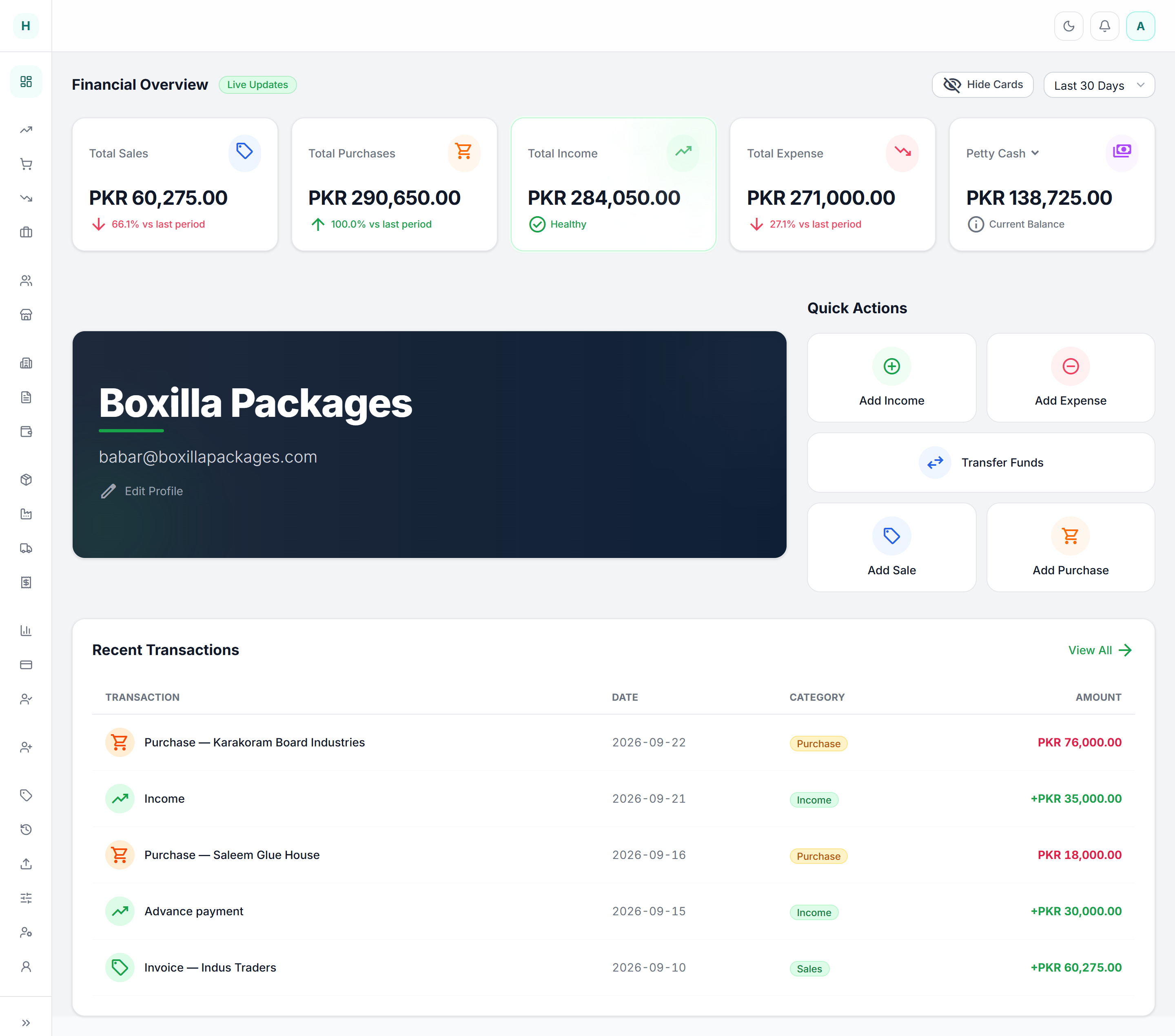
See where the business stands.
Sales, purchases, income, expense and cash on one dashboard, without asking anyone.
Know what is on the floor.
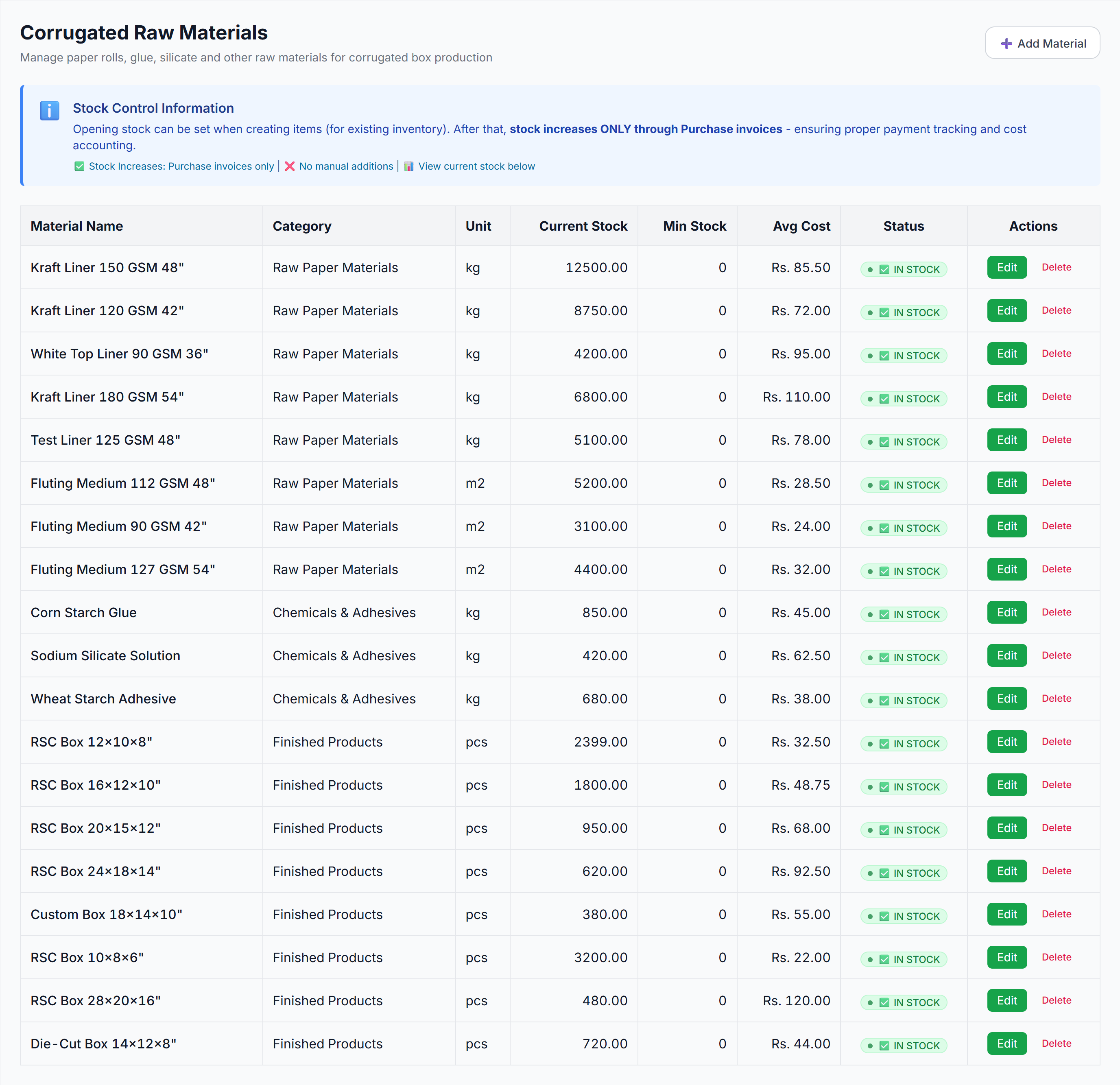
Reels, rolls, glue and finished boxes in one table with unit, quantity, cost and status.
Ship it, then bill it.
Record a challan against stock, then turn what was delivered into an invoice.
Four rules I
designed against.
Speak the factory's language.
GSM, ply, reels and challans appear as first-class fields, not free text.
One entry, every effect.
A purchase raises stock; a delivery lowers it; an invoice reads what shipped.
Obvious over clever.
Plain labels, one primary action per screen, and units printed beside every number.
Cost travels with the box.
Material cost follows the product into stock, dispatch and margin.
Six months to build.
Seven months in daily use.
Interviews, workflow mapping, the design system and first screens.
Data set up and the team trained on the live system.
Purchases, stock, dispatch and billing move into Hisabi.
Registers and spreadsheets retired for this work.
From paper reel
to paid invoice.
Supplier bills bring reels, rolls and glue in.
Typed materials with units and average cost.
Box specs turn into material demand.
Challans move finished boxes out.
Billing from what was delivered.
Profit, margin and receivables.
The whole business,
one screen in.
Eight modules,
one connected record.
Balances and ledgers
Bills and payables
Stock in, with cost
Reels, rolls, glue, boxes
Specs to material demand
Challans against stock
From delivered lines
Profit, margin, receivables
Plus cash, bank, expenses, HR and users
A quiet system
for dense records.
Tokens from the active theme · Green leads in light mode, amber in dark
Small patterns keep
big workflows legible.
MATERIALS
BY THE
KILO.
A corrugated factory buys paper by weight, board by area and boxes by count. The stock model had to hold all three.
Every material
knows its unit.
Reel paper
Kraft, test and white-top liners by GSM and deckle width.
Corrugated roll
Fluting medium measured by the board area it makes.
Chemicals
Starch glue, silicate and adhesives, consumed by ratio.
Finished box
RSC and die-cut boxes, carrying their production cost.
Stock in plain sight.
Every reel, roll and chemical in one table, with the unit, current stock, average cost and status on the same line.
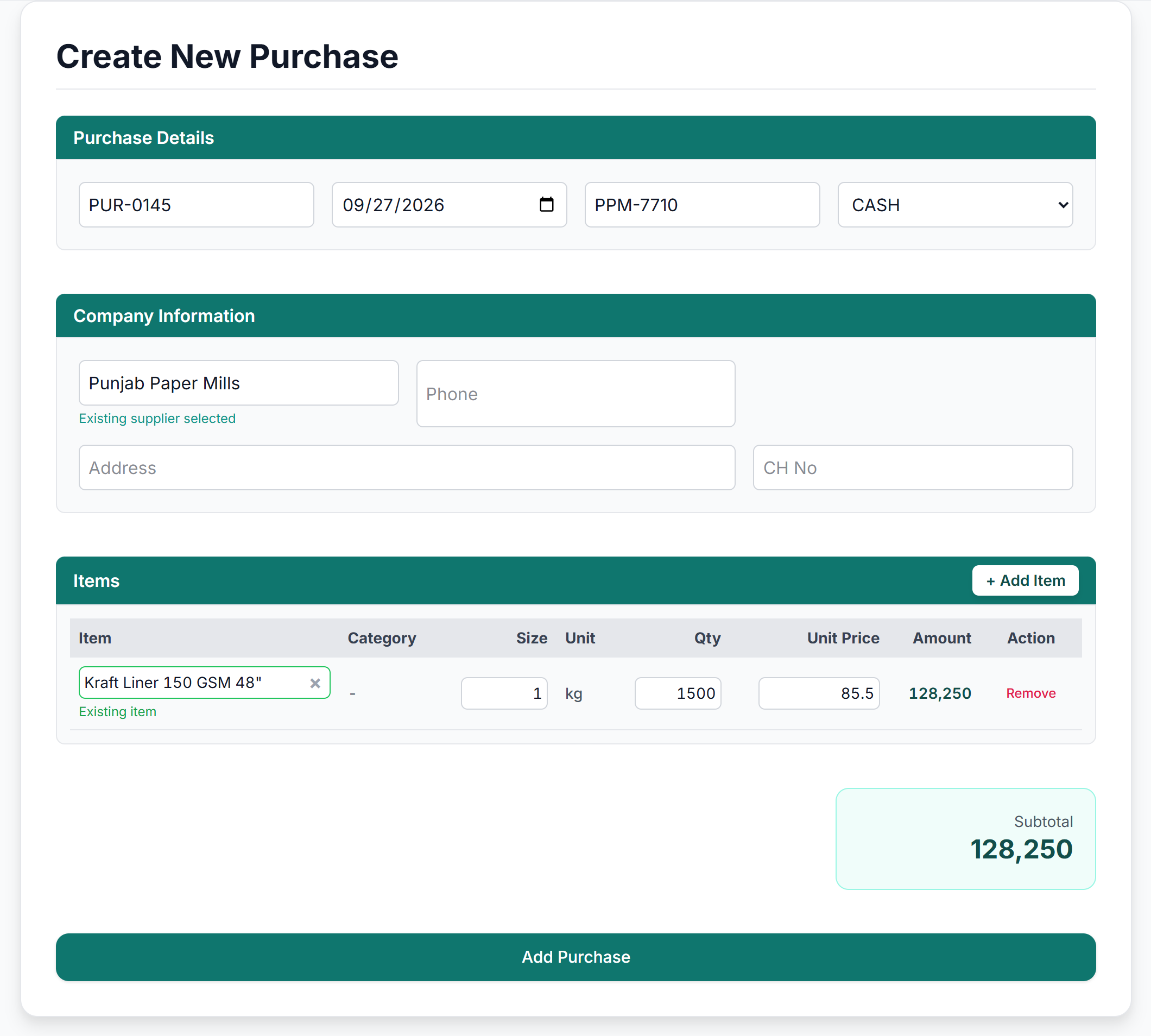
A purchase is a stock event.
A supplier bill records the company, the items, quantity, unit and price, and raises inventory at the same time.
DIMENSIONS
BECOME
MATERIAL.
A job starts with a physical spec: ply, liner, flute, box size, quantity and expected wastage.
Specify the box. The system does the rest.
Choose the ply, then the outer paper and the rolls it needs. Enter the box size and quantity; consumption and cost are calculated from stock.
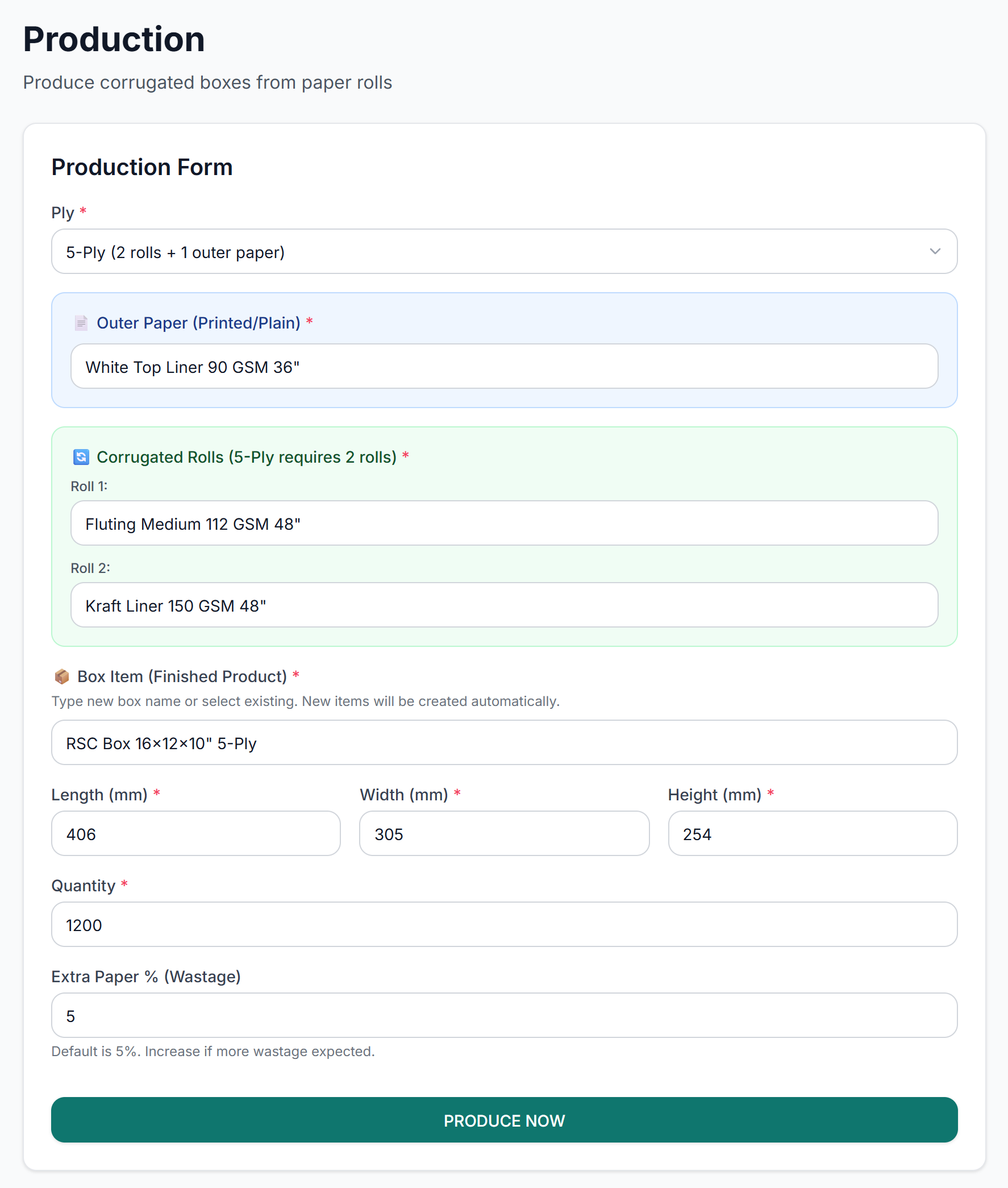
Turn a box spec into material demand.
The production service works out every kilo and square metre a job needs from its geometry, ply layout, paper weight, wastage and glue ratio.
One posting moves both
sides of stock, and the cost.
Consumed quantities and their costs recorded as movements.
The output count for the job.
Stored on the stock so dispatch and margin use it later.
OUT THE
DOOR,
ONTO THE
BOOKS.
Delivery, invoicing and reporting share one chain of records.
A challan moves boxes out
and remembers what they cost.
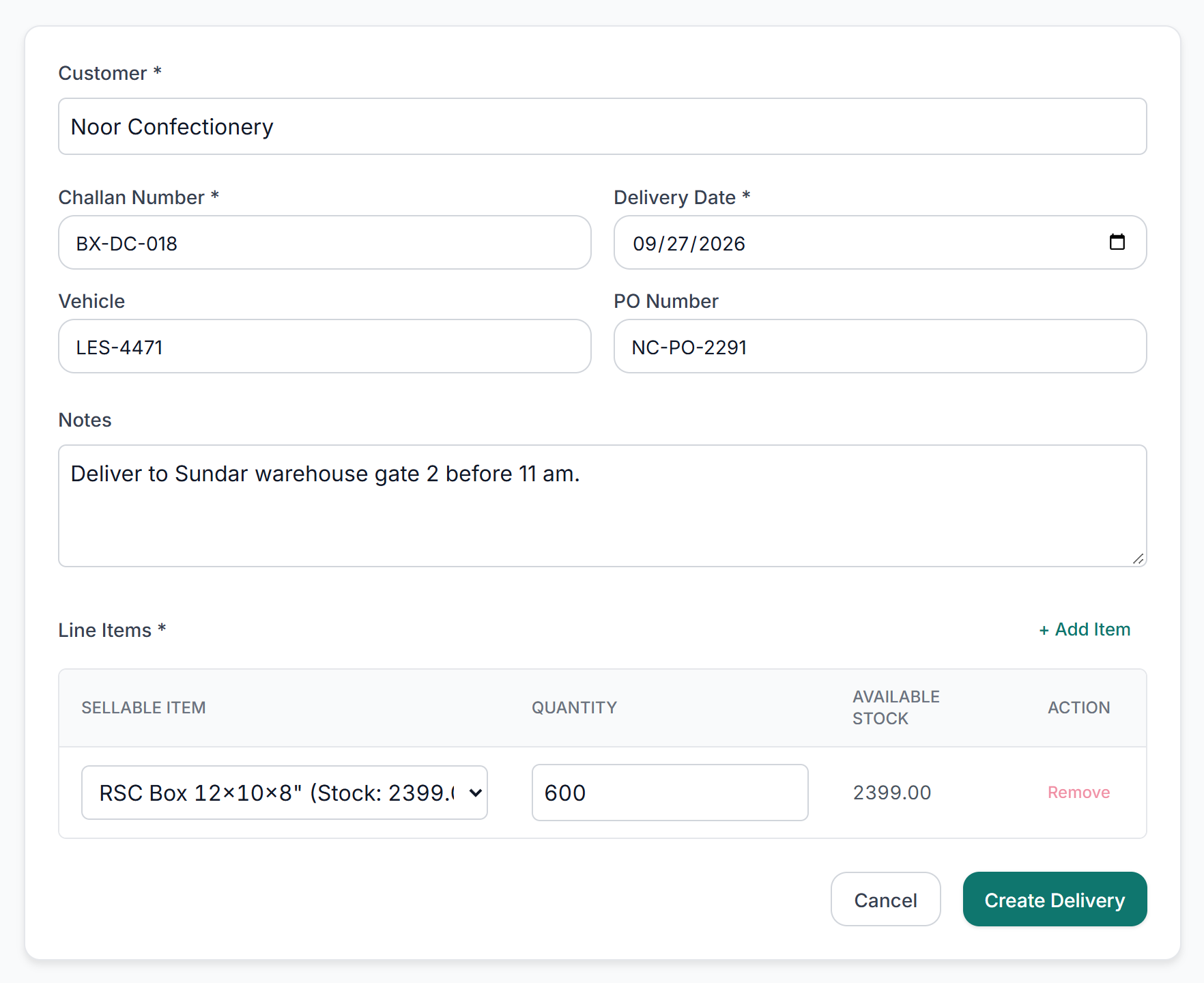
Customer, challan, vehicle and line items, with available stock beside each line
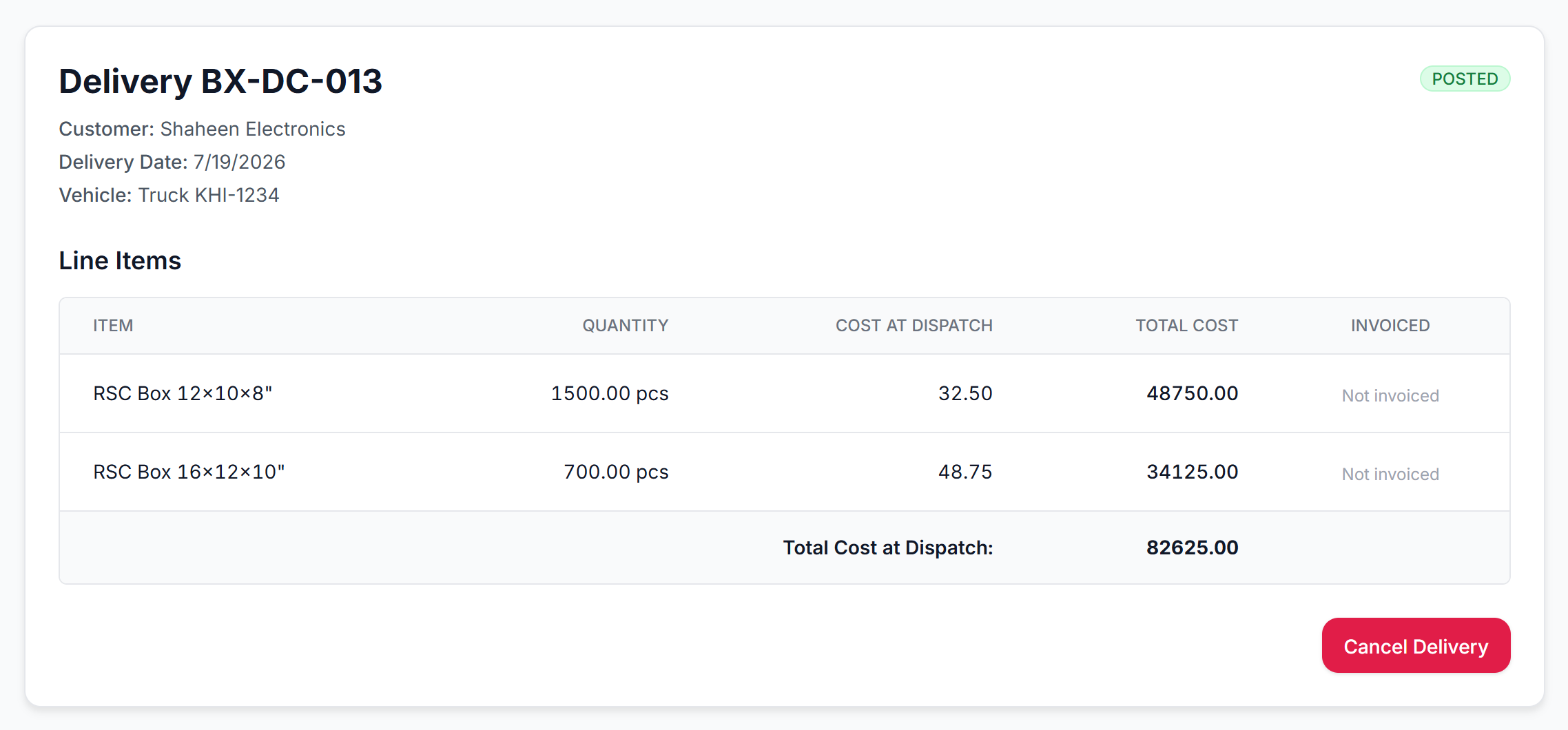
Posted: cost at dispatch is captured per line
One dispatch touches
more than one record.
Customer, date, finished item and dispatch quantity.
The service checks the quantity exists before posting.
Finished goods decrease; the cost at dispatch is recorded.
Posted lines become available for billing.
Motion study · Material to record
Plays as you scroll
Materials
Production
Delivery
Invoice
04 /Invoice and margin
Records from the demo databaseInvoice what was delivered.
See the margin before you send it.
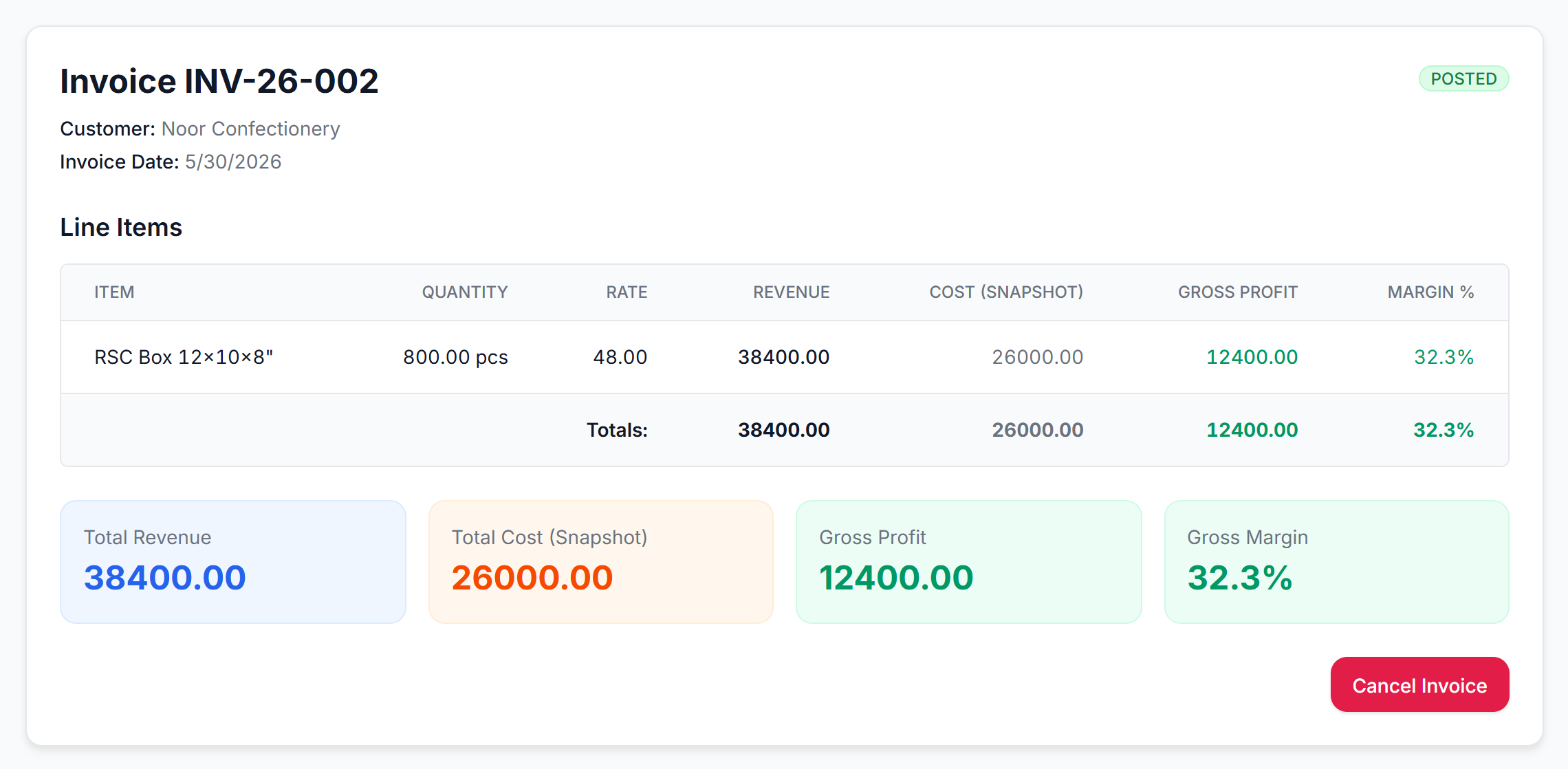
Only what shipped, and hasn't been billed, can be invoiced.
The service blocks over-billing a line.
Gross profit and margin per line, at a glance.
Operations become
the financial view.
Invoiced revenue rolls into the dashboard.
Supplier bills and payables per supplier.
Petty cash and bank ledgers with transfers.
Profit, customer margin and receivables.
Margin sits
beside the line item.
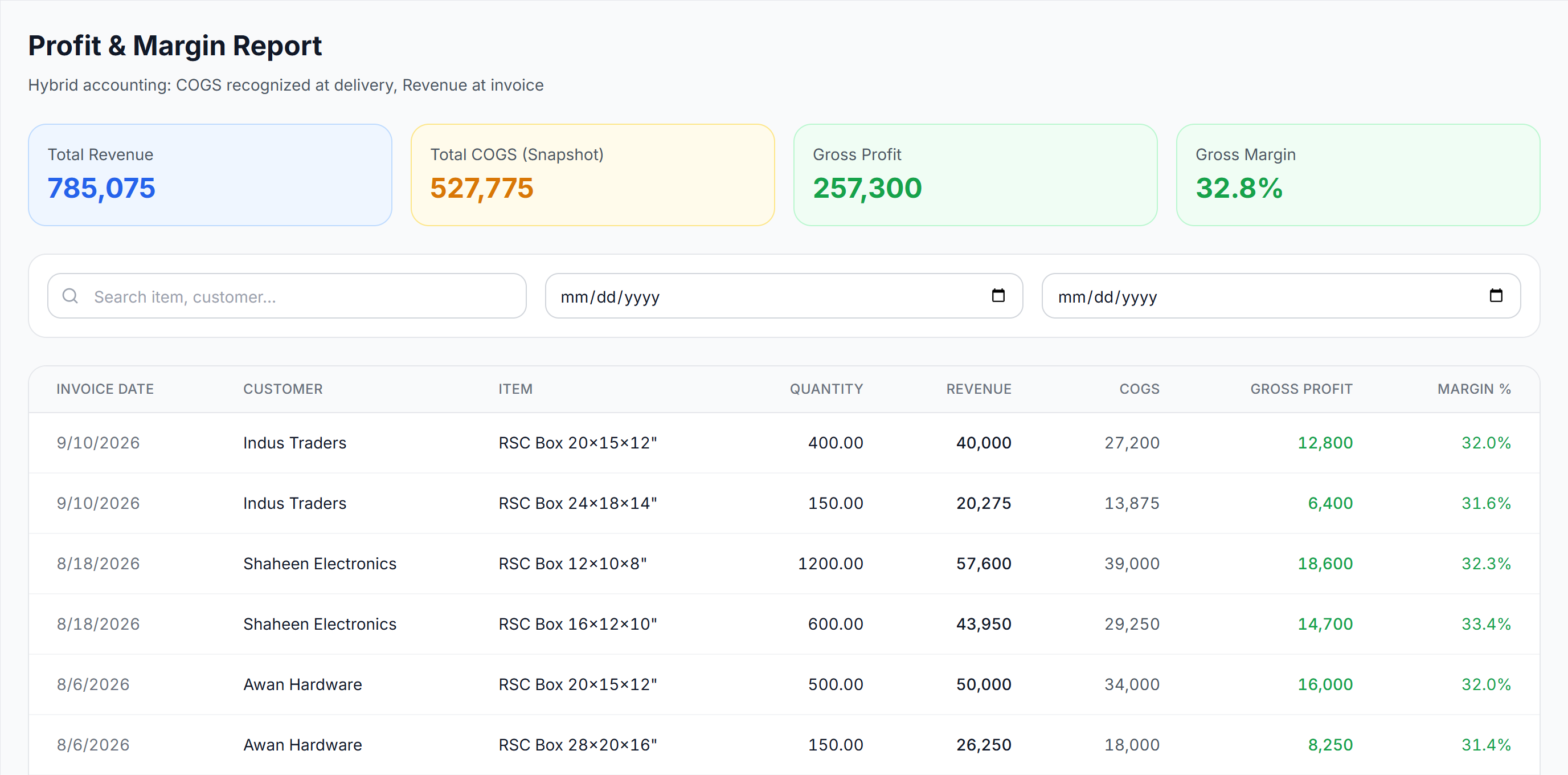
Recognised when billed.
What the box cost when it left.
Per line, filterable by date and customer.
A second lens:
profit by customer.
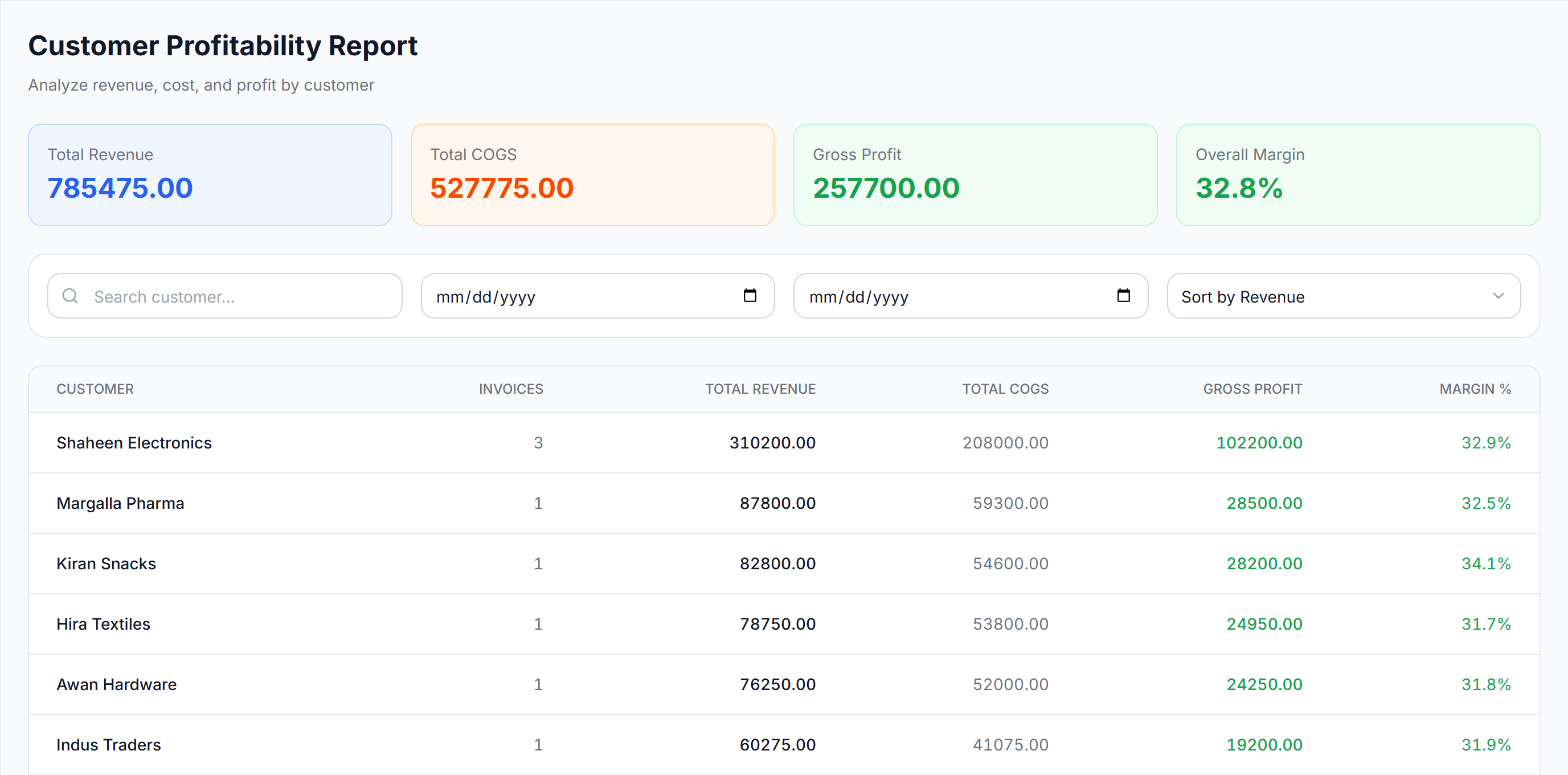
Invoices rolled up per account.
Which customers carry the margin.
Answer "who matters most" in one click.
One structure.
Two modes.
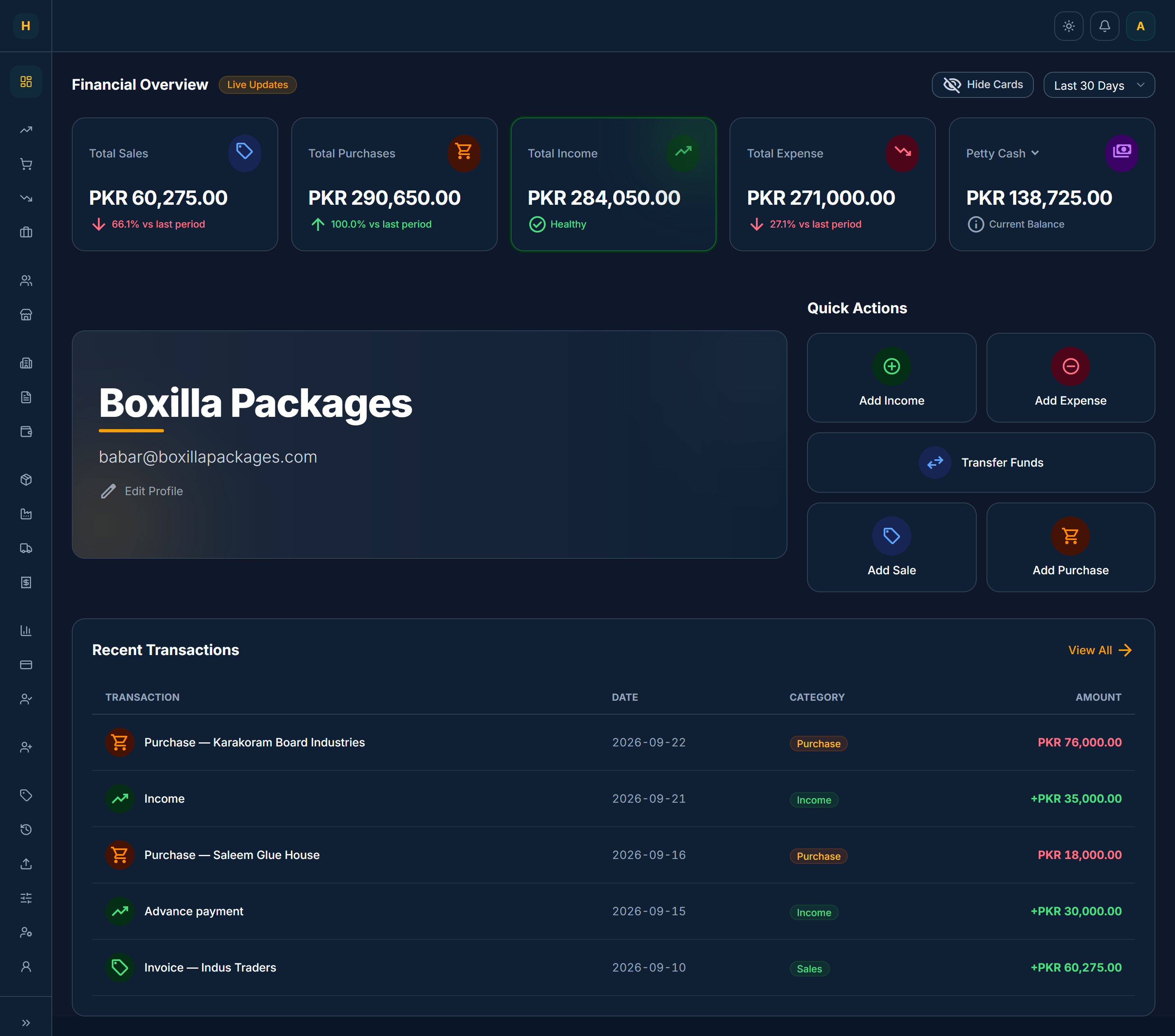
From the interface
to the data model.
Screens, forms and tables
Routes, API handlers, auth
Typed relational models
The business record
Protect the
stock ledger.
He built it around how our business actually runs, not the other way round.
From handover
to the only system.
In daily use since the March 2026 rollout.
Registers, spreadsheets and generic software replaced by April.
Connected modules, from purchase to profit report.
Simple is a data-model problem.
- Screens got simpler once the schema used the factory's own words.
- Designing and building the product myself meant no detail was lost at handoff.
Cost the job before it starts.
- Cost estimation for new jobs, the client’s first request.
- A full draft → calculate → post production-order screen.
- Payment tracking inside receivables.
BUILT FOR THE WORK BEHIND THE BOX.
Product design and development by Umar Bin Akbar Ali.